
Setting up a limited company in the United Kingdom can be remarkably fast, but only if the company formation application is completed correctly the first time. Even small errors at this stage can lead to rejection by Companies House and delay incorporation by days. This guide explains each stage of our online application on our website, what it requires, why it matters, and where applicants most often go wrong.
Before You Start the UK Company Formation Application
The online registration form appears once you have chosen your company formation package, added any extra services, and completed payment. From that point, the typical UK company formation application takes around ten minutes to complete. Some experienced applicants finish in less.
Your details are submitted directly to Companies House, the UK’s official registrar of companies. Accuracy is therefore critical at every stage. Even a minor error can trigger a rejection, requiring you to resubmit the application and delaying incorporation.
If anything is unclear during the process, our support team is available by email, online chat, and telephone. We strongly recommend reaching out before submitting if you are unsure about any field, rather than correcting issues afterwards.
Choosing Your Company Name and Type
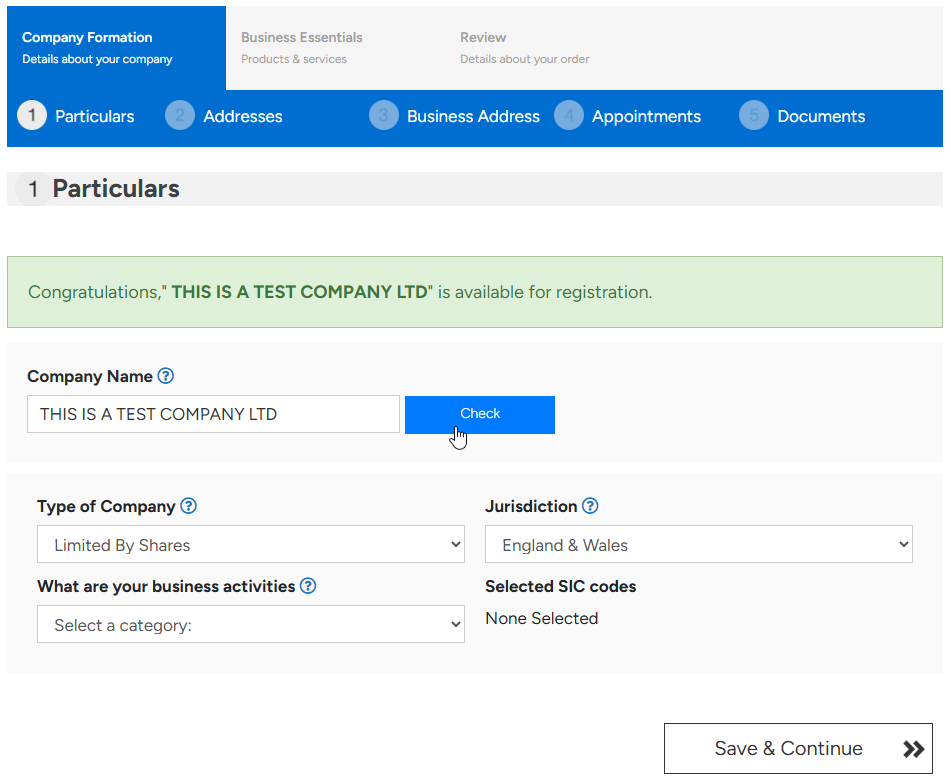
The first screen asks for your company name and type. After typing the proposed name, click “Check” to confirm availability. The system flags any name that is identical or too similar to an existing UK company.
The single most common error at this stage is omitting the correct name ending. A private limited company must end with “Limited” or “Ltd”. A limited liability partnership must end with “LLP”. Companies limited by guarantee must also include the word “Limited” in their name.
Spacing and punctuation matter. For example, “ABC Company” must be entered as “ABC Company Limited” or “ABC Company Ltd”, with a space before the suffix. The Companies House register treats the ending as part of the legal name, so it must be exact.
SIC Codes in the Application
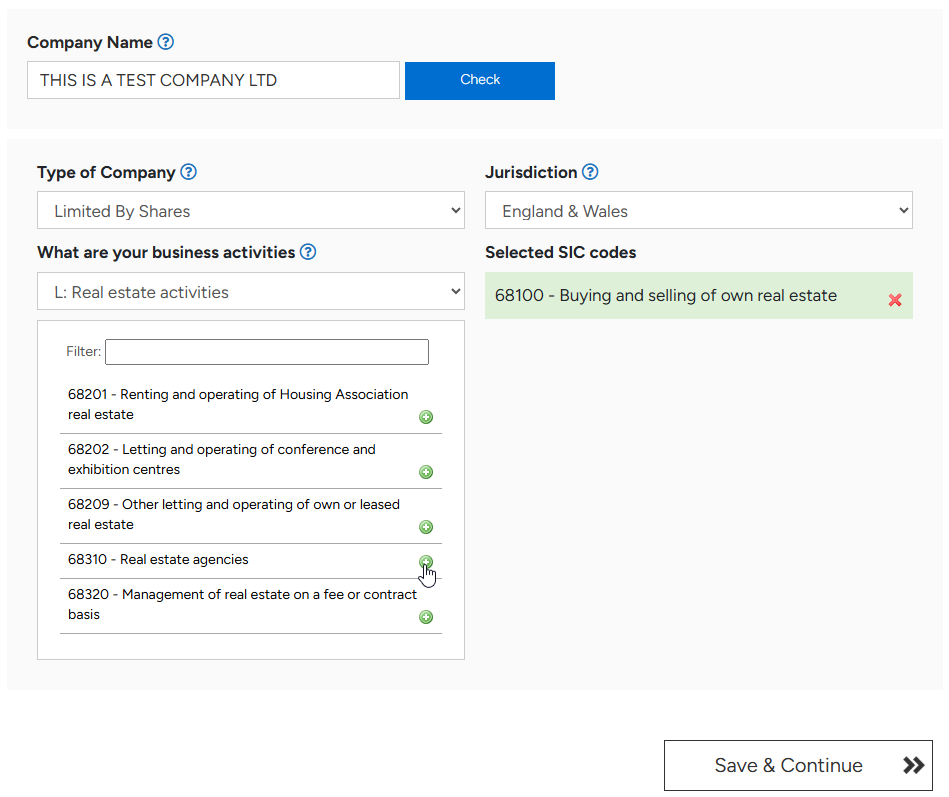
Every limited company and LLP must declare at least one SIC code in its UK company formation application. SIC stands for Standard Industry Classification. The code tells government and the public what your company actually does, for example IT services, construction, retail, or financial advisory work.
In the form, select the relevant industry from the drop-down list, then choose the activity that most closely matches your business. Press the green plus icon to confirm each code. You may add between one and four SIC codes per company.
If no code feels like a perfect match, choose the closest available option. SIC codes are not permanent. They can be updated each year when you file your annual confirmation statement at Companies House. For most small businesses, a single well-chosen code is sufficient. Multiple codes only become necessary when the company genuinely operates across distinct activities from day one.
Choosing the Jurisdiction
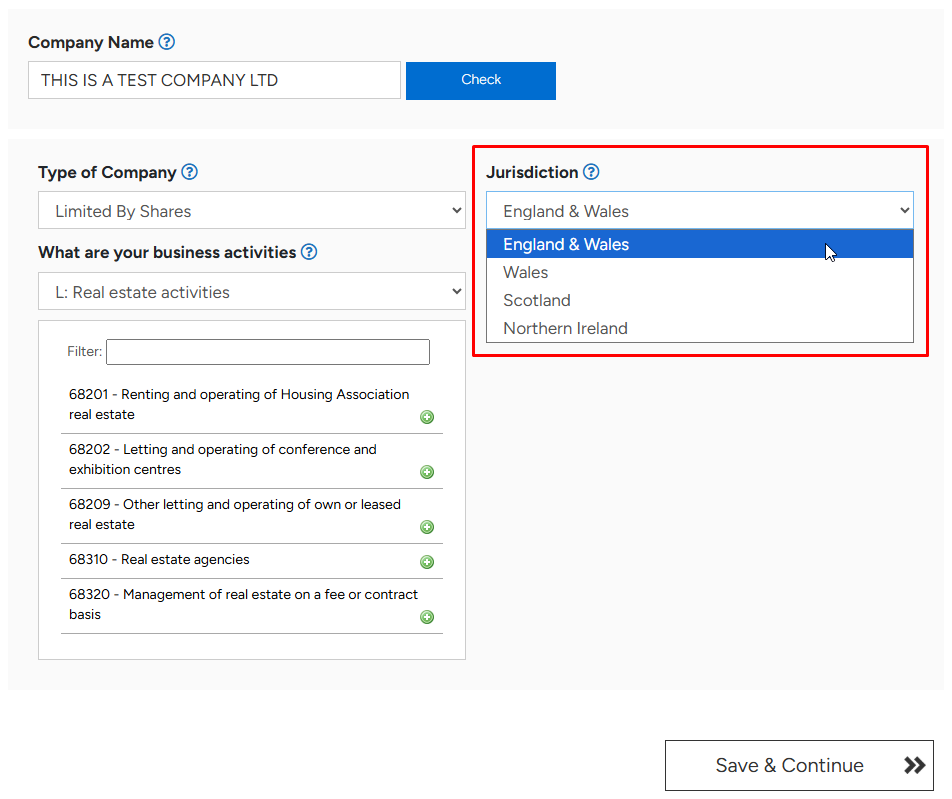
Your company must be registered under a specific jurisdiction within the United Kingdom. The four options are England and Wales, Wales only, Scotland, and Northern Ireland. The choice determines which Companies House office handles the company and which legal regime applies in certain edge cases.
The most important rule here is straightforward but easily overlooked. Your registered office address must remain within the chosen jurisdiction for the lifetime of the company. A company registered in Scotland, for example, can never have its registered office in London. If you intend to use a London address, the company must be registered under England and Wales.
Once jurisdiction is selected, click “Save and Continue” to proceed.
Registered Office in the Formation Application
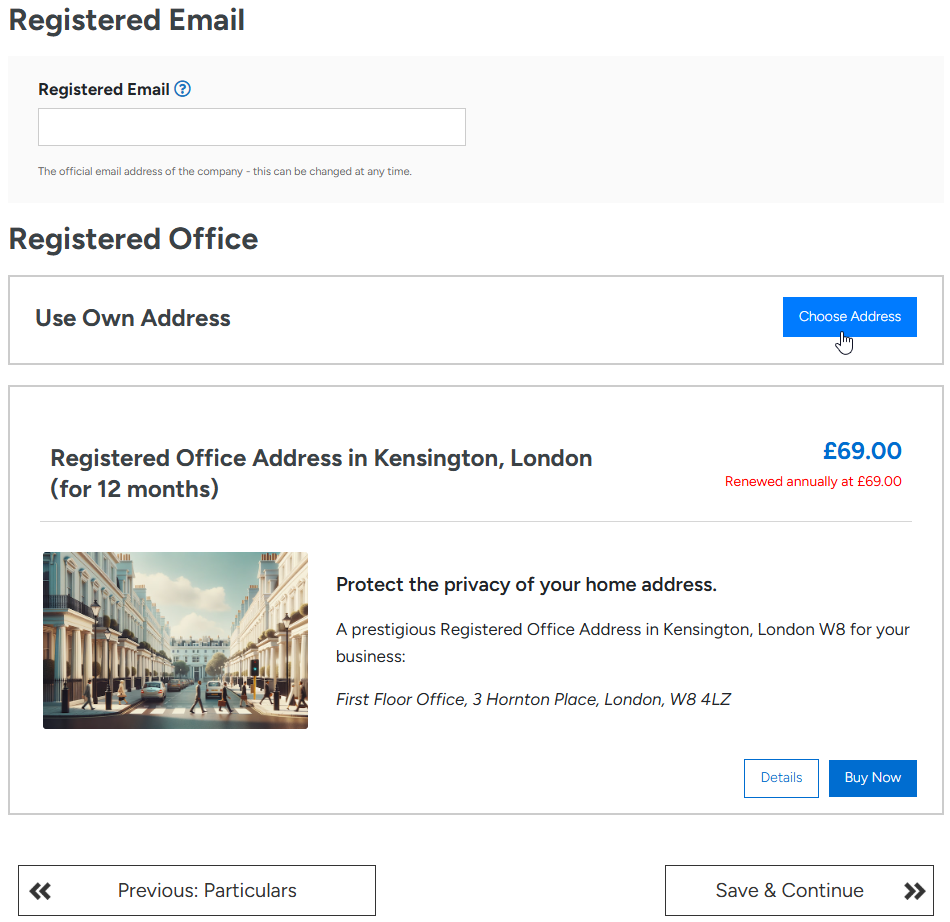
The next stage of the application form covers the registered email and registered office address. Both are points of contact for official correspondence. Every UK company is required by law to have a registered office, and this address appears on the public Companies House register.
The registered office must be a physical postal address located within the chosen jurisdiction. A PO Box alone is not acceptable. The address must be capable of receiving statutory mail and physical service of legal documents.
If our registered office address service is included in your package, you will see it marked as included on this screen. If you prefer to use your own address, click “Choose Address” and enter it in the field provided.
Using Your Own Address Versus Our Address
Choosing your own address is permitted, but it will appear publicly on the Companies House register and remain searchable indefinitely. For company directors who work from home, this is a significant privacy consideration. Even after the company is dissolved, historical records remain visible.
If you use our registered office address instead, we scan and email all official correspondence from Companies House, HMRC, and other government agencies. In that case, you will also need to enter a forwarding address. The forwarding address is not shown publicly. We use it to redirect any physical post received on your behalf.
Business Postal Address Service
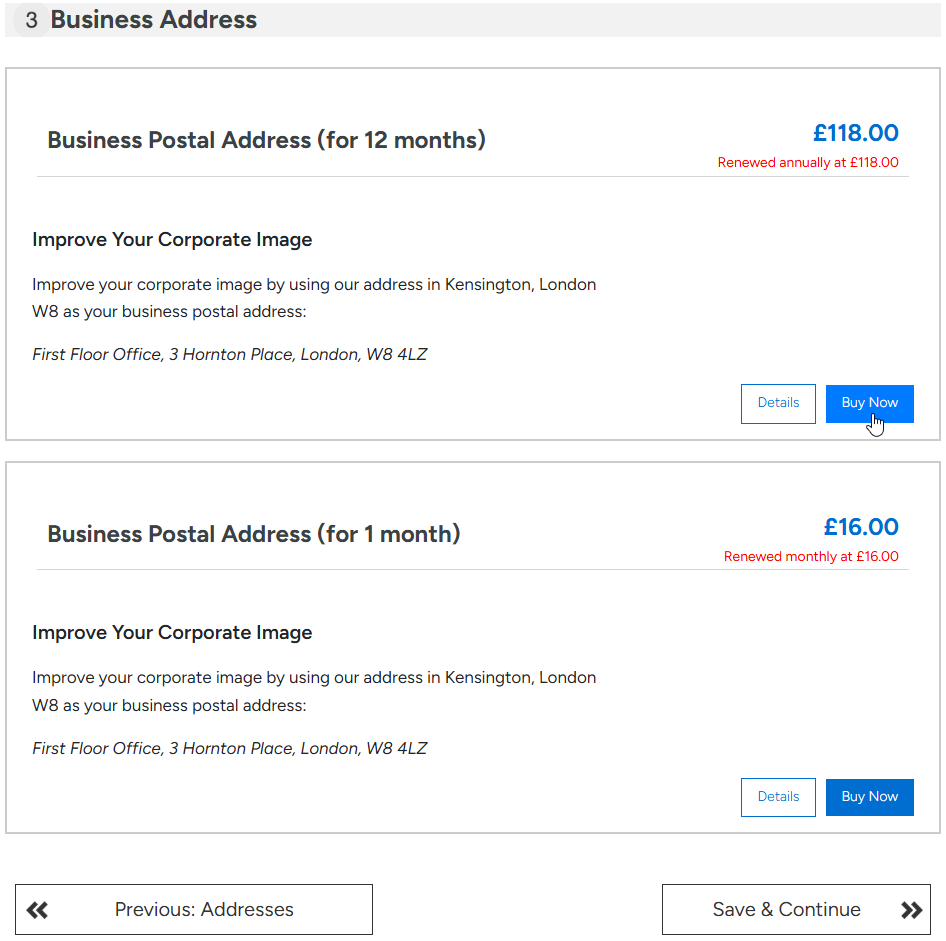
The registered office covers official government mail only. If you also wish to use our address for general business correspondence, you need our separate Business Address service. This is not a legal requirement and is purely optional.
The service is useful when you do not want to disclose a personal or trading address to banks, suppliers, customers, and other third parties. Letters from non-government senders are not covered by the registered office and would otherwise be returned or undelivered.
If this service is part of your package, you will see it marked as included. Otherwise, you may purchase it at this stage or skip it and continue. As with the registered office service, a forwarding address is required so we can redirect general business mail to you.
Appointing Officers in the Application
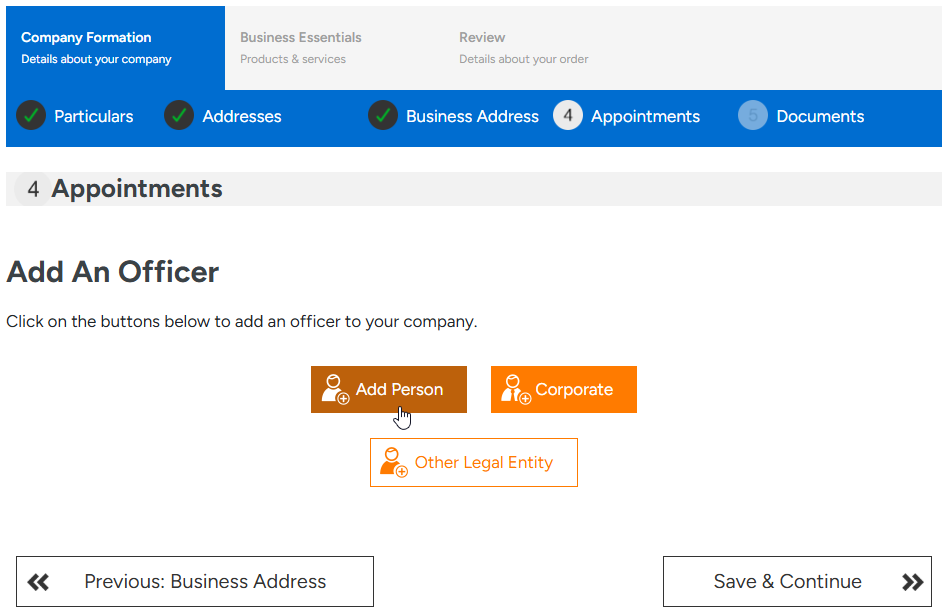
The next stage is where you appoint your company officers. Three orange buttons appear: Person, Corporate, and Other Legal Entity. Most applicants click Person to appoint themselves or other individuals.
Use Corporate when a company is being appointed as a shareholder, director, or PSC. This is common in group structures, holding company arrangements, and certain investment vehicles. Use Other Legal Entity for unusual cases, such as a corporation sole, a national or local government body, or an international organisation acting as a PSC.
In a typical setup involving one or two natural persons, the Person button is the only one needed.
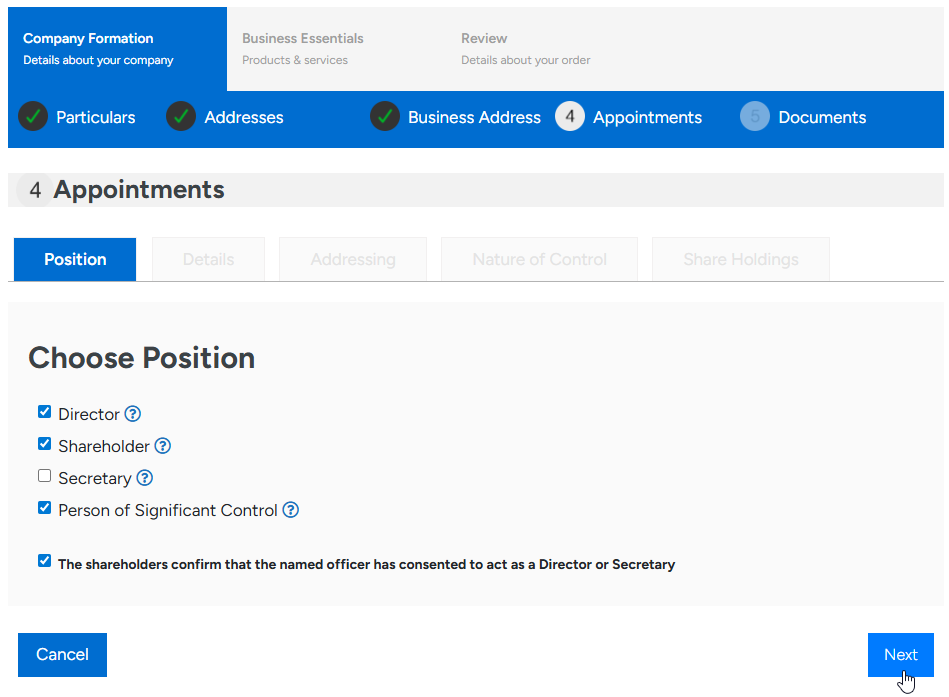
Once you click Add Person, a new screen appears with four position options: Director, Shareholder, Secretary, and Person with Significant Control. These represent three distinct forms of control over the company: management, ownership, and ultimate control. The same individual can hold all three roles, and frequently does.
A common mistake is to tick only one box. If the same person manages the company, owns it, and ultimately controls it, all three relevant boxes must be ticked in a single entry. The system does not infer additional roles automatically.
A private UK company must have at least one director who is a natural person aged sixteen or over, at least one shareholder, and at least one PSC. A company secretary is no longer a legal requirement for private companies, although you may appoint one if your governance arrangements call for it. The consent tick box must always be confirmed before continuing.
Persons with Significant Control
A Person with Significant Control, usually shortened to PSC, is anyone who ultimately controls more than 25% of the company. Control can arise through share ownership, voting rights, or the power to appoint or remove the majority of directors. Identifying the company’s PSCs and reporting them to Companies House is a legal obligation under the Small Business, Enterprise and Employment Act 2015.
The consequences of failing to comply are serious. Both the company and the responsible officers can commit a criminal offence by failing to identify a PSC, failing to keep the PSC register up to date, or supplying false information.
In practice, if you hold more than 25% of the shares in a single-shareholder or small company, you are a PSC, and the box must be ticked when you appoint yourself as a shareholder.
Officer Details and Identity Verification
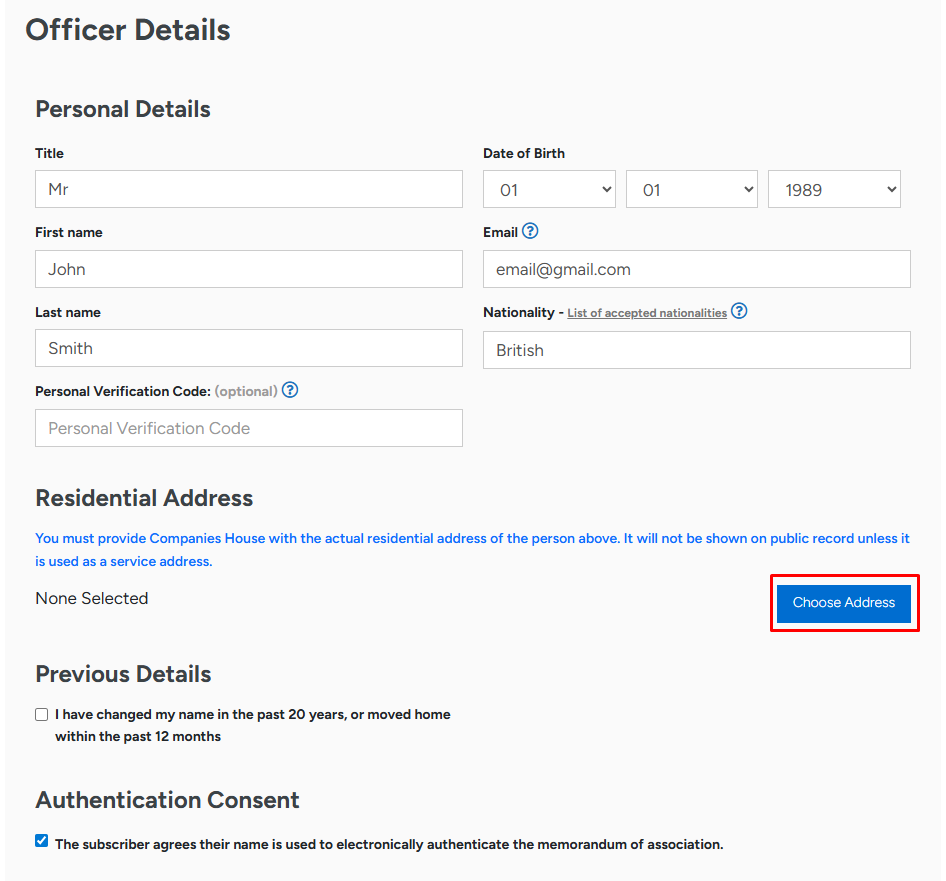
The next screen requires personal details for each appointed officer, including full name, date of birth, nationality, occupation, and residential address. Every field must be completed accurately. The form will not allow you to continue until all required fields are accounted for.
The residential address must be the officer’s actual home address, not a business address. Submitting an office, shop, warehouse, or other commercial address as the residential address will result in rejection by Companies House. The home address does not appear on the public register unless you also use it as your service address. It can be inside or outside the United Kingdom.
This screen also includes a field for a Personal Verification Code (PVC). Companies House now requires all directors and PSCs to complete identity verification before a company can be formed under their name. If the individual already has a PVC, enter it here. If not, leave the field blank and complete verification at a later stage.
There are two ways to complete identity verification:
- Directly through the official Companies House identity verification service on gov.uk, free of charge.
- Through our own Companies House identity verification service, which can be added to your order at any point.
The Service Address
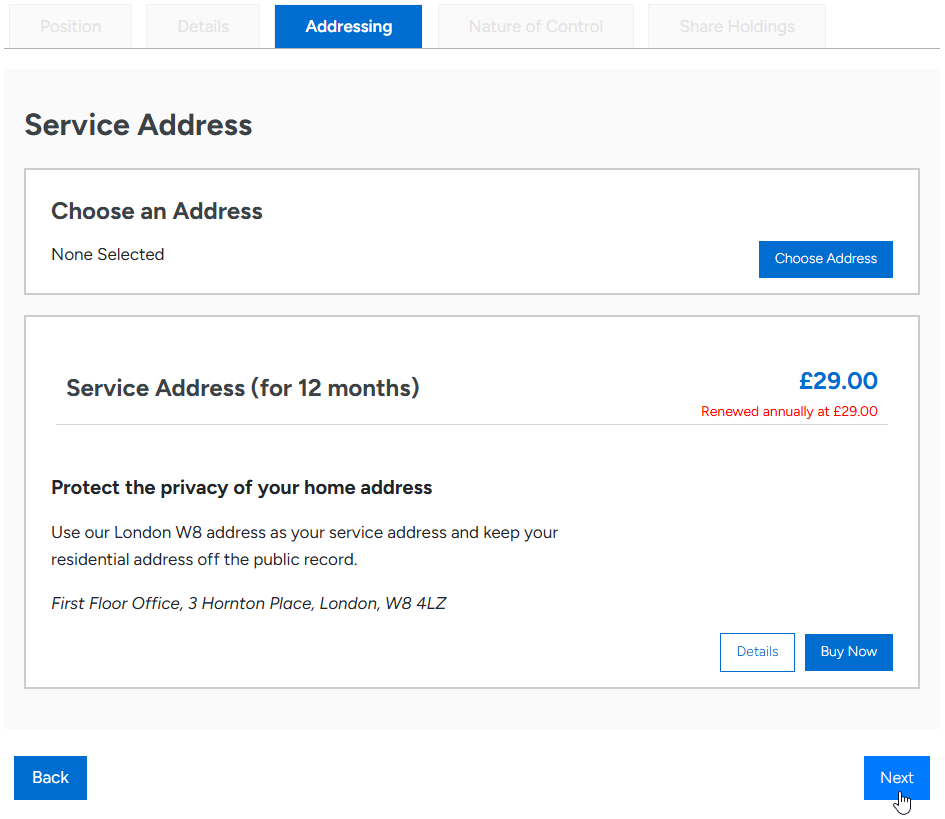
The service address is distinct from both the residential address and the registered office. It is the official correspondence address for each individual officer, used to receive personal statutory mail from Companies House, HMRC, and other government bodies. Unlike the residential address, the service address appears on the public Companies House register.
You may use your home address as the service address, but it will then become public. Many directors and PSCs prefer to keep their home address private, which is why we offer a director’s service address service as an option. The service address may be inside or outside the United Kingdom.
If our service address is part of your package, you will see it marked as included. If you have purchased it, you must still provide a forwarding address so we can redirect any letters received in your name. The forwarding address does not appear on the public register.
Nature of Control for PSCs
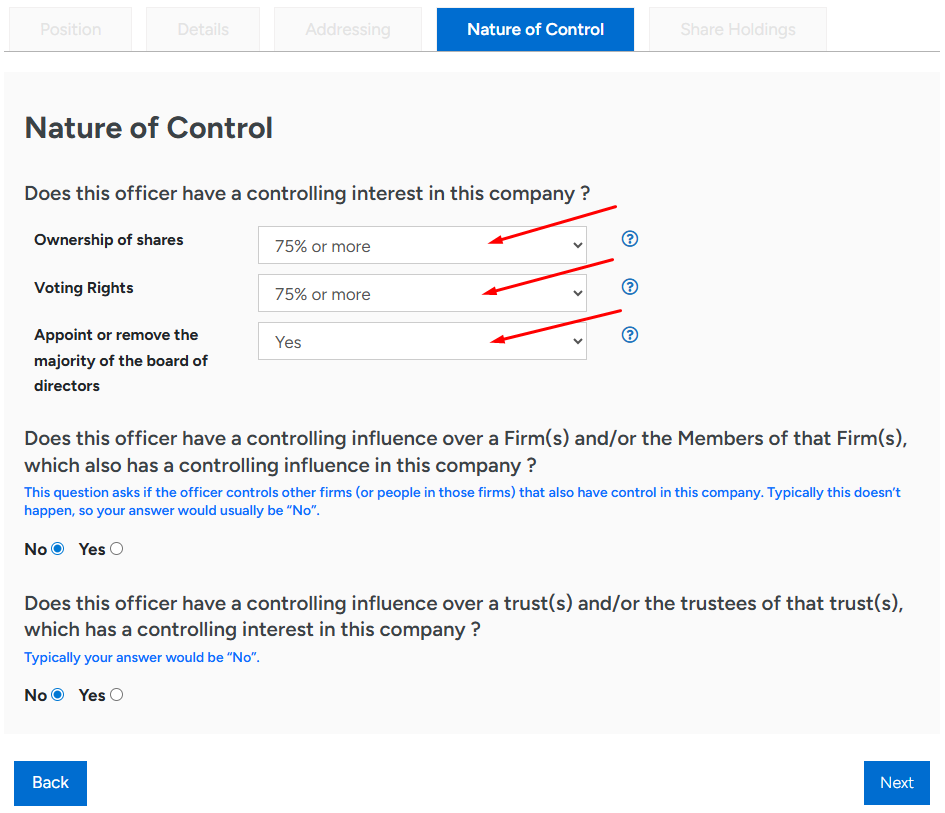
The Nature of Control tab appears whenever a person has been appointed as a PSC. You must select, from a drop-down menu, the level of control held. Companies House groups control into three standard bands:
| Level of control | Definition |
|---|---|
| Lower band | More than 25% but no more than 50% of shares or voting rights |
| Middle band | More than 50% but less than 75% of shares or voting rights |
| Upper band | 75% or more of shares or voting rights |
For a single-shareholder company in which one individual owns the entire share capital, the upper band applies. Voting rights are recorded separately and usually mirror share ownership, but they may differ where multiple share classes carry different voting weight.
You must also indicate whether the PSC has the right to appoint or remove the majority of the board of directors. Two further questions deal with whether the PSC exercises significant influence or control over the activities of a trust or firm that itself holds an interest in the company. These are mainly relevant in trust structures and group arrangements.
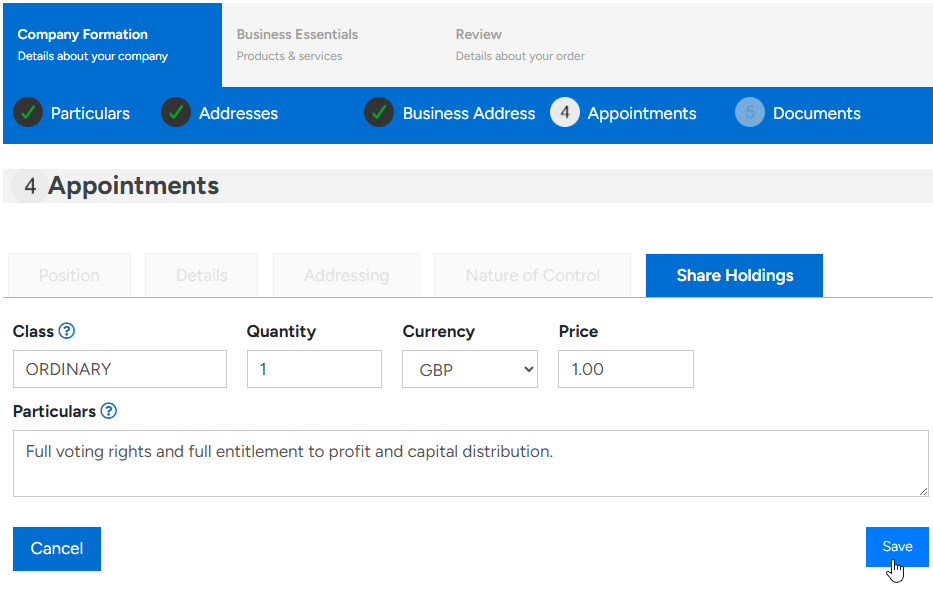
The next tab covers share holdings. For each shareholder, you enter the share class, the quantity of shares held, and the value per share. A particulars box describes the rights attached to that share class and how profits are distributed.
For most straightforward companies, the form’s pre-filled defaults are appropriate. The default is a single ordinary share at a nominal value of £1, which is the most common starting structure for small UK companies. Once you save the entry, additional share classes may be added if your business calls for them.
Multiple share classes are useful where founders want different rights for different investors, for example separating voting from dividend entitlements. Where multiple share classes are involved, the rights and economic entitlements should be drafted with care, since they will define how profits and control are shared for the lifetime of the company.
Articles of Association in the Application
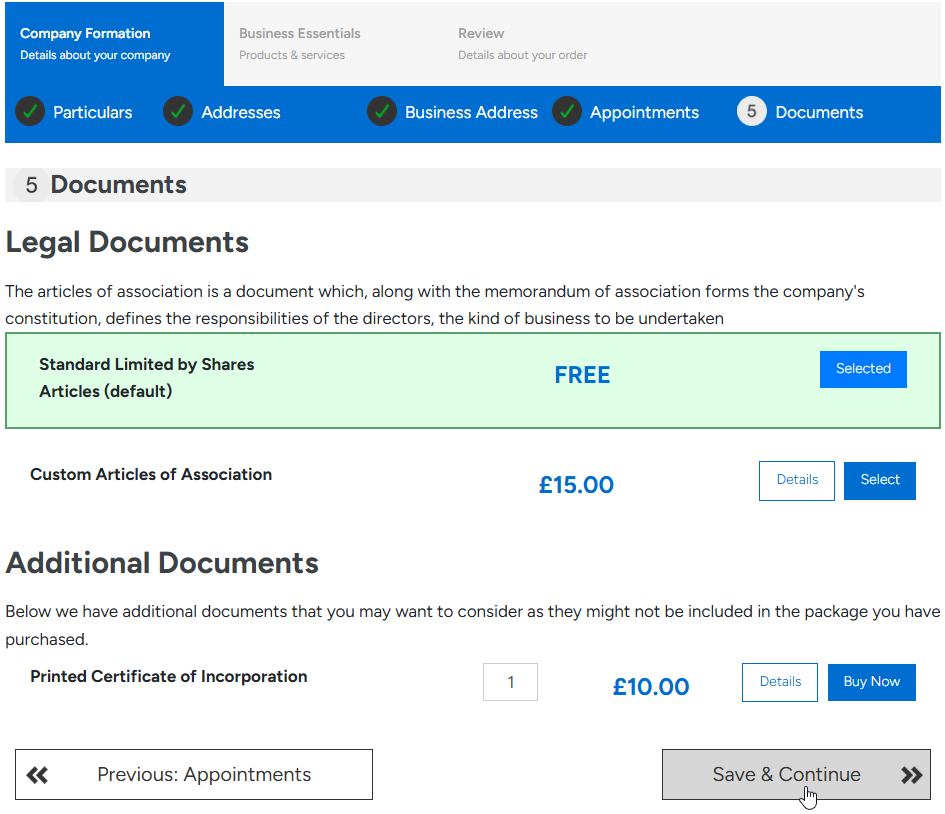
The Articles of Association set out the internal rules governing how the company is run. The application offers two options. The first is the standard set of articles, provided free of charge and suitable for the vast majority of new companies. Approximately 99% of our clients select this option.
The second option allows you to upload your own bespoke articles. This is normally appropriate where a solicitor has drafted articles tailored to a particular shareholder agreement, investment structure, or governance requirement. Bespoke articles override the relevant model provisions but must remain consistent with the Companies Act 2006.
Choosing the standard articles is not a permanent decision. The articles can be amended later by a special resolution of the shareholders, provided the proper procedure is followed.
Banking in Your Formation Application
The next stage of the UK company formation application offers a choice of business banking options. We strongly recommend selecting one even if you do not plan to open an account immediately. Adding a referral now allows the chosen bank or payment institution to contact you promptly once the company is formed.
Typically, the form presents a choice across as many as eight banks and payment institutions, each with a streamlined online application process. The exact list varies because banks open and close their referral portals from time to time. Once your company is formed, the chosen bank usually contacts you within forty-eight hours by phone, email, or to arrange a meeting with a business manager.
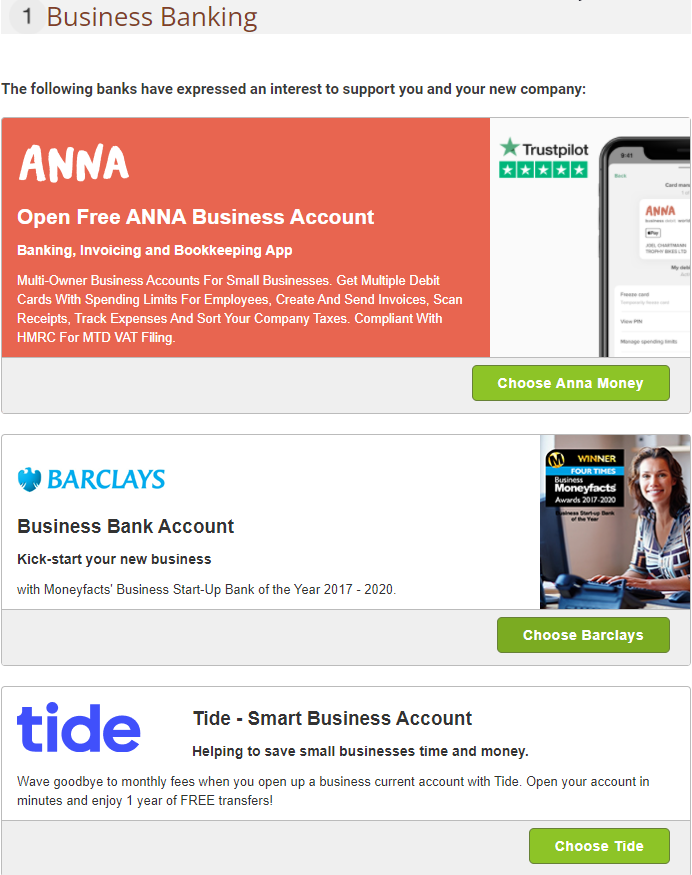
The banks displayed at this stage are mostly UK high street names such as Barclays and Lloyds. These banks focus on companies owned and managed by UK residents and apply standard UK customer due diligence. Our service here is a free referral. We cannot guarantee that any particular bank will accept the application, since the final decision rests with the bank itself.








For non-UK residents forming a UK company, opening a high street business account is more demanding but far from impossible. We have partnered with several payment institutions that offer business accounts specifically designed for companies owned or managed by non-residents. These options appear later in the application, alongside the optional extras.
Optional Extras for Your Application
After banking, the form presents further business support offers from our partners. The list changes over time but typically includes accounting software, card acquiring services, business insurance, and similar professional tools. None of these are mandatory.

The next screen displays optional extras. Some of these are included free of charge depending on the chosen package. Others can be added at the time of formation or later through your client portal. Two options worth particular attention are:
- Introduction to an accountant. We have partnered with an accountancy firm that specialises in supporting newly formed UK businesses. The firm normally sends a welcome email within two working days of incorporation.
- Further banking options. We work with several payment platforms offering global business accounts, including business accounts for non-residents and suitable options for UK-resident owners.
You are not obliged to make every decision now. Most extras can be added at any later stage by logging into your portal.
Final Submission of the UK Company Formation Application
The review page is your final opportunity to confirm the entire UK company formation application before submission. Check every detail carefully: the company name and ending, SIC codes, jurisdiction, addresses, officer details, share classes, and PSC information. Mistakes that pass through this stage will reach Companies House and may cause rejection.
Tick the legalities box to confirm that the company’s intended activities are lawful. This is not a formality. By ticking it, you make a statutory declaration about the company’s purpose. False declarations carry legal consequences under the Companies Act 2006.
On the final page, the amount due will normally be zero, since the package was paid for at the start. If you have added optional extras during the application, the outstanding balance will be shown for payment. Complete your KYC details and any other requested information to satisfy customer due diligence requirements. You may then choose to subscribe to our newsletter, accept the terms and conditions, and press Checkout to submit.
After Your Application Is Submitted
Once submitted, the application moves into our internal review queue. A member of our customer service team will email you shortly to request the documents needed for the compliance checks required under UK anti-money laundering regulations. The exact documents depend on the structure and the residency of the officers.
Once the documents are approved, we submit your application to Companies House. Incorporation can take as little as three hours, although busier periods may push the timeline closer to forty-eight hours. As soon as the company is formed, you receive your certificate of incorporation and accompanying company documents by email.
Forming Your UK Company with Confidence
A successful UK company formation depends on completing each stage of the application correctly. The form is relatively short, but each field carries legal weight. A few minutes of attention to the right name ending, a sensibly chosen SIC code, an accurate residential address, a properly identified PSC, and the correct level of control will save days of delay and avoid resubmission.
Our team at Uniwide Formations supports clients throughout the process and is available by email, online chat, and telephone whenever a question arises. When you are ready, you can begin your UK company formation application straight away.
Tags: Company Formation